ROS2 create_rateとsleepの注意点
環境: humble
注意点
- シングルスレッドで使用した場合デッドロックが発生する
- 使用間隔があく場合sleep()しても最初の2回は設定通りの待ち時間にならない
- 作ったら壊さないとリソースが解放されない
説明
create_rateは内部でcreate_tiemrを実行してTimerを生成、Timerは設定された周期でevent.set()を実行している。
sleepではevent.wait()(とevent.clear())を実行している。
1.について
シングルスレッドだとsleep()をよびだしたスレッドが生きてるのでTimerのcallbackがブロックされデッドロックが発生する。2.について
使用間隔があくとevent.set()済みになるため1回目のsleep()ではevent.wait()が即終了する。 2回目のsleep()での待ち時間はevent.set()発生タイミング次第。 3回目から設定どおりの待ち時間になる。

- 3.について
生成したtimerは勝手には消えない(Node._timersに登録されてる)のでリソースも解放されない。解放にはNode.destroy_rateをしてやる必要がある。 github.com
確認
デッドロックが発生する書き方
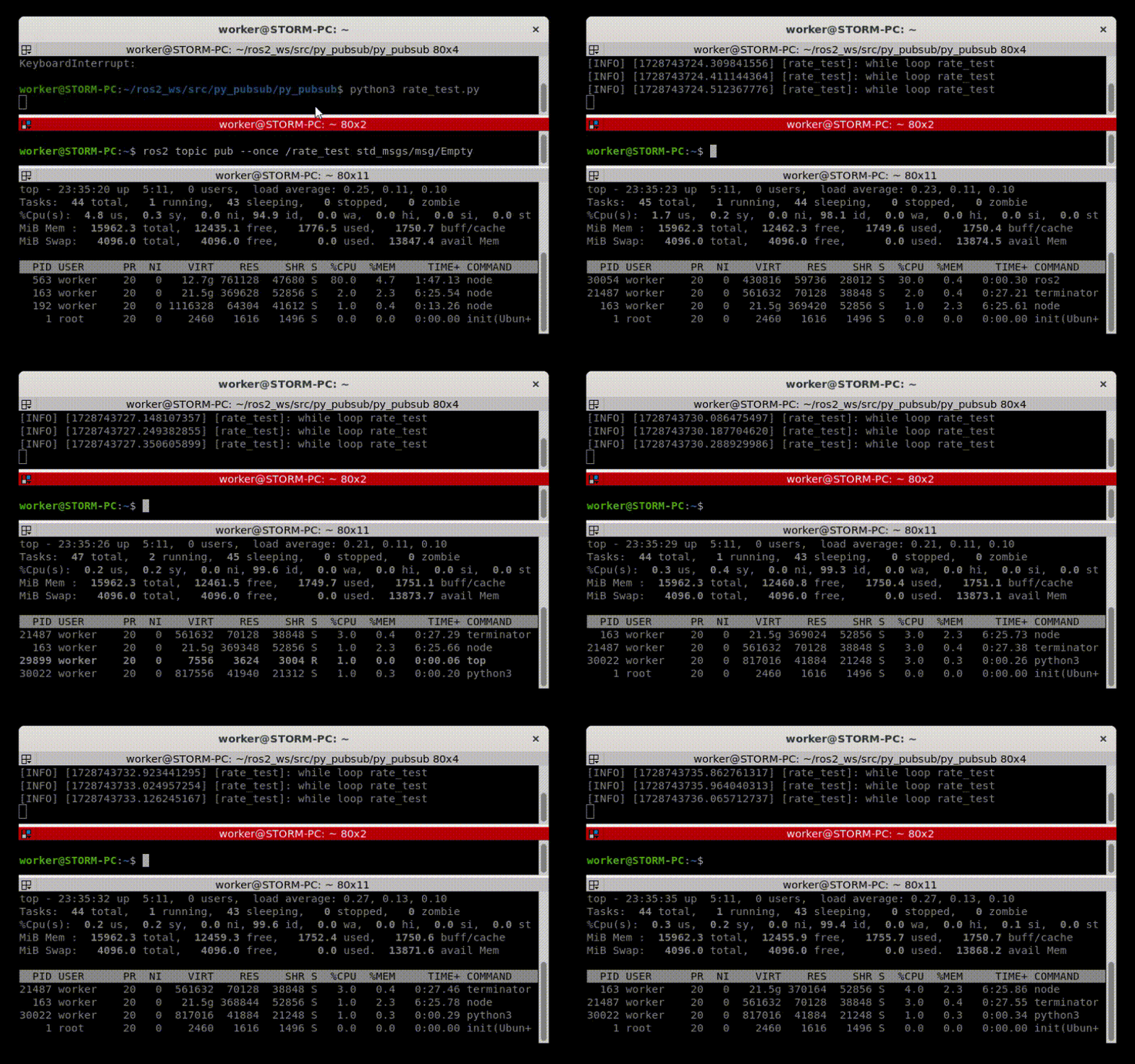
subscribeのcallbackまでにevent.set()が発生するので1回目のsleepは通る
import rclpy
from rclpy.node import Node
from std_msgs.msg import Empty


class RateTest(Node):
    def __init__(self):
        super().__init__("rate_test")
        self.sub = self.create_subscription(Empty, "rate_test", self.cb_test_rate, 10)
        self.r = self.create_rate(1)

    def cb_test_rate(self, _):
        while rclpy.ok():
            self.get_logger().info("while loop rate_test")
            self.r.sleep()


def main(args=None):
    rclpy.init(args=args)
    sleep_test = RateTest()
    rclpy.spin(sleep_test)
    sleep_test.destroy_node()
    rclpy.shutdown()


if __name__ == "__main__":
    main()
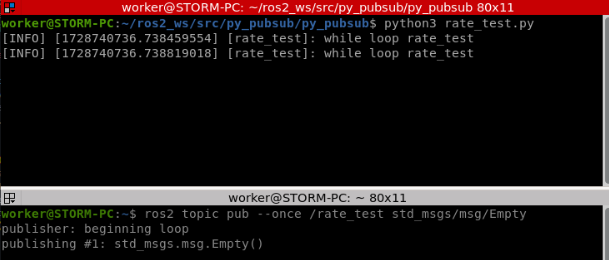
デッドロックは発生しないけどsleep時間が安定しない書き方
マルチスレッドにしたのでデッドロックは発生しない。 使用間隔があくので最初の二回は期待したsleep時間にならない
import rclpy
from rclpy.node import Node
from std_msgs.msg import Empty
from rclpy.executors import MultiThreadedExecutor


class RateTest(Node):
    def __init__(self):
        super().__init__("rate_test")
        self.sub = self.create_subscription(Empty, "rate_test", self.cb_test_rate, 10)
        self.r = self.create_rate(1) # 作り置き

    def cb_test_rate(self, _):
        while rclpy.ok():
            self.get_logger().info("while loop rate_test")
            self.r.sleep()


def main(args=None):
    rclpy.init(args=args)
    sleep_test = RateTest()
    executor = MultiThreadedExecutor() # マルチスレッドにした
    executor.add_node(sleep_test)
    executor.spin()
    sleep_test.destroy_node()
    rclpy.shutdown()


if __name__ == "__main__":
    main()
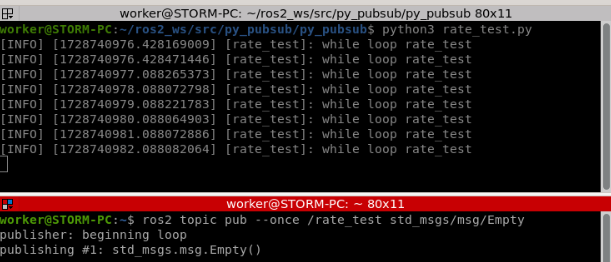
期待通りの待ち時間だけどリソースを食いつぶす書き方
使うときに作成しているのでsleep時間は期待通り。 後処理していないのでリソースを食いつぶす。
import rclpy
from rclpy.node import Node
from std_msgs.msg import Empty
from rclpy.executors import MultiThreadedExecutor


class RateTest(Node):
    def __init__(self):
        super().__init__("rate_test")
        self.sub = self.create_subscription(Empty, "rate_test", self.cb_test_rate, 10)

    def cb_test_rate(self, _):
        while rclpy.ok():
            self.get_logger().info("while loop rate_test")
            self.create_rate(1).sleep() # 作りっぱなし(リソースは解放されない)


def main(args=None):
    rclpy.init(args=args)
    sleep_test = RateTest()
    executor = MultiThreadedExecutor()
    executor.add_node(sleep_test)
    executor.spin()
    sleep_test.destroy_node()
    rclpy.shutdown()


if __name__ == "__main__":
    main()
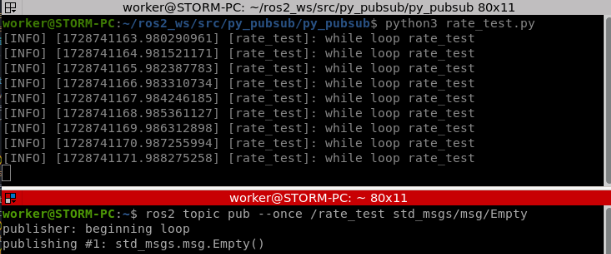
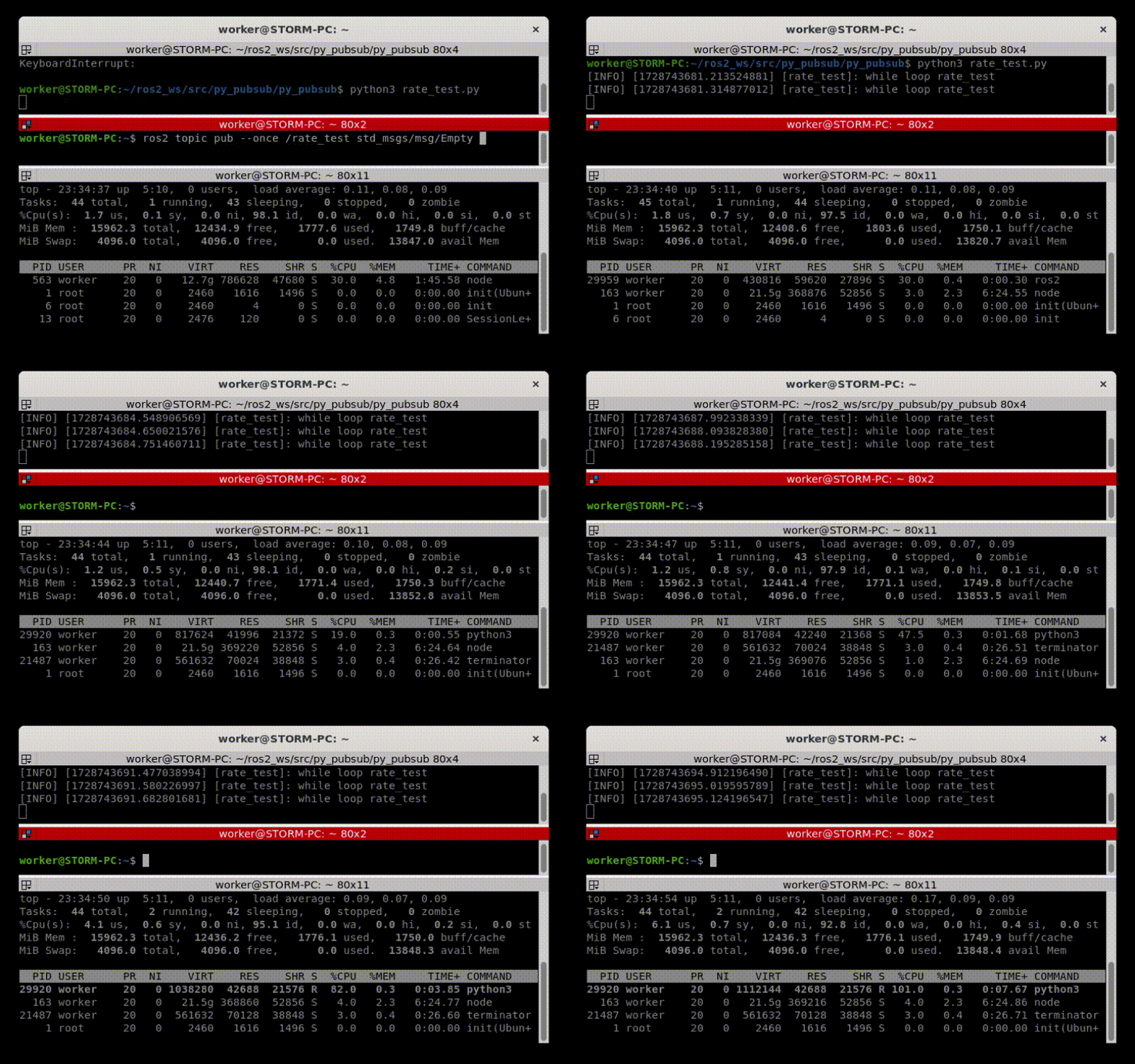
後始末する書き方
Node.destroy_rateで作成したRateを廃棄するのでリソースも解放される
import rclpy
from rclpy.node import Node
from std_msgs.msg import Empty
from rclpy.executors import MultiThreadedExecutor


class RateTest(Node):
    def __init__(self):
        super().__init__("rate_test")
        self.sub = self.create_subscription(Empty, "rate_test", self.cb_test_rate, 10)

    def cb_test_rate(self, _):
        while rclpy.ok():
            self.get_logger().info("while loop rate_test")
            r = self.create_rate(10)
            r.sleep()
            self.destroy_rate(r) # 後始末


def main(args=None):
    rclpy.init(args=args)
    sleep_test = RateTest()
    executor = MultiThreadedExecutor()
    executor.add_node(sleep_test)
    executor.spin()
    sleep_test.destroy_node()
    rclpy.shutdown()


if __name__ == "__main__":
    main()
座標変換について
回転やら座標変換やら調べてたらこんがらがってきたので整理
前提条件
- 座標変換
座標系と
が存在する。
は原点を通るベクトルnを回転軸として
をθ回転させたもの。
の点p1を
に変換する座標変換行列を
と書く(
)。
の点p0を
に変換する座標変換行列は
(
)。
- 回転
原点を通るベクトルnを回転軸として点p0を点p1にθ回転させる回転行列をと書く。
ベクトル[0,0,1] (Z軸)でθ回転させる回転行列は
3次元座標変換
は
をX,Y,Z軸の順に回転させたものと考える。
X軸を回転軸としてΦ回転->Y軸を回転軸としてθ回転->Z軸を回転軸としてψ回転
固定角
のX,Y,Z軸を使用した場合を固定角と呼ぶ(他にも呼び方あるらしい)。
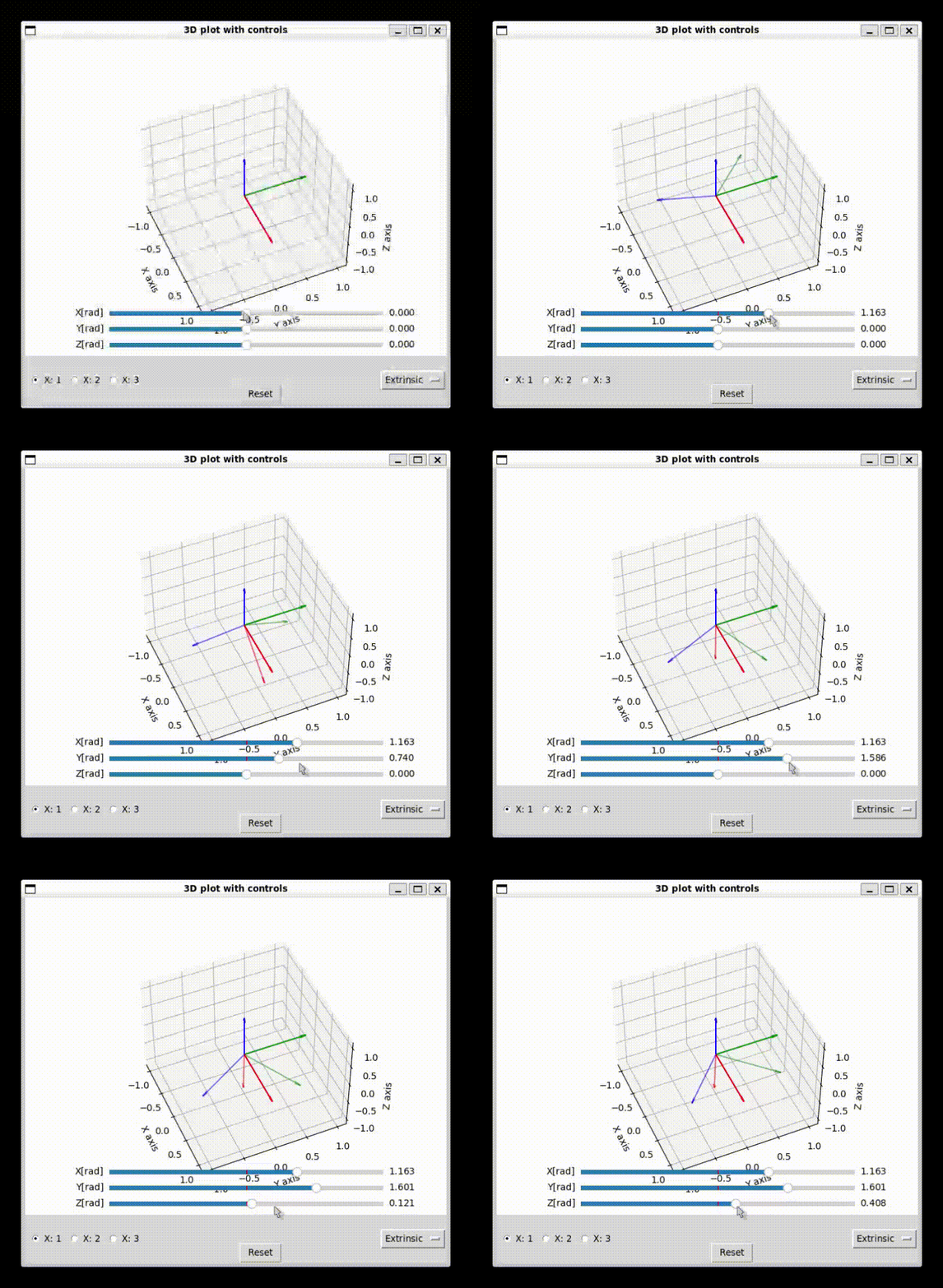
固定角の座標変換行列は
オイラー角
のX軸、X軸で回転後のY軸、X軸で回転後のY軸で回転後のZ軸を使用した場合をオイラー角とよぶ(他にも呼び方あるらしい)。
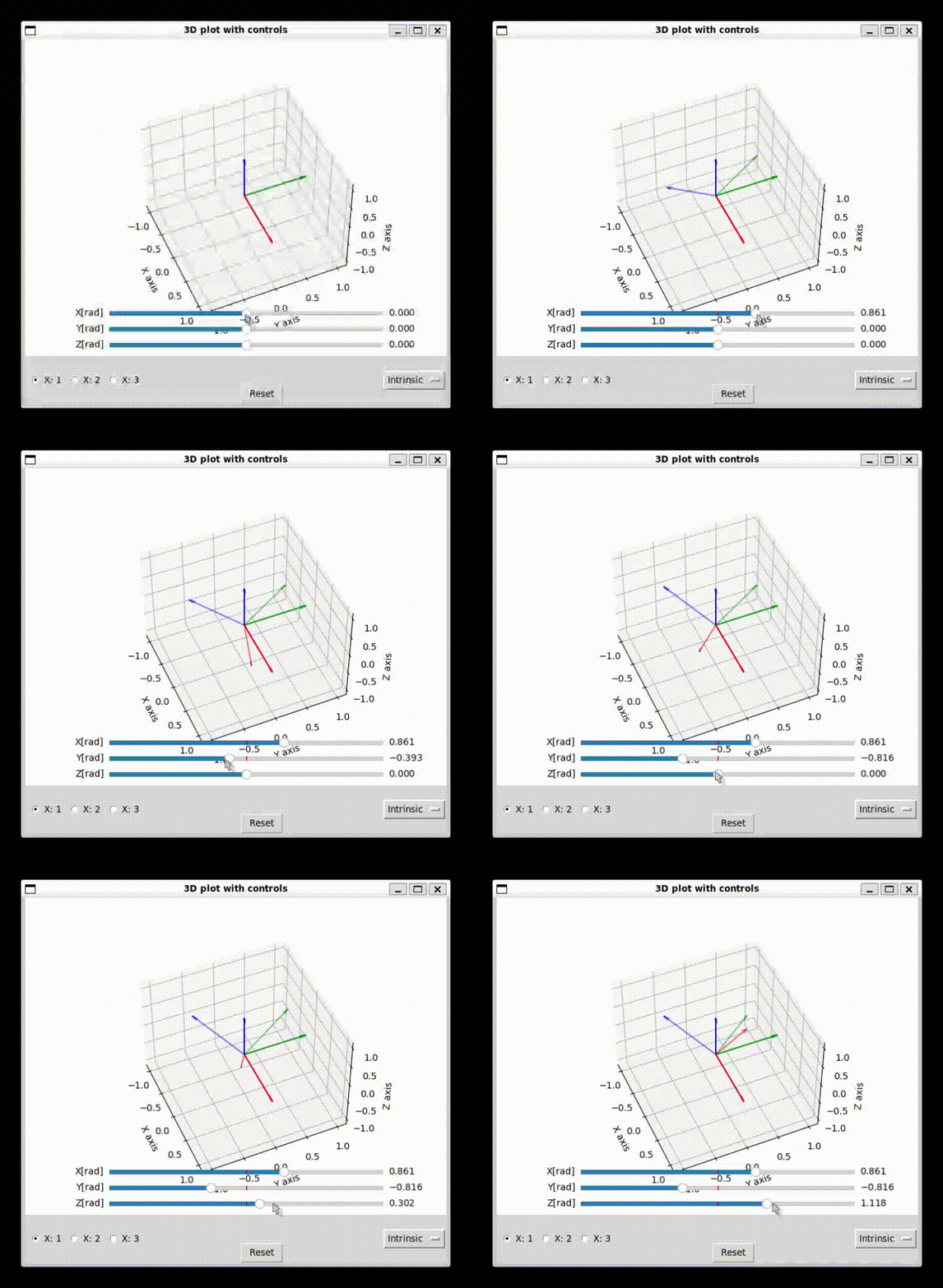
オイラー角の座標変換行列は
考え方
- 回転行列の性質
回転行列は直交行列。また、逆方向に回せば元に戻るので
- 回転行列と座標変換行列の関係
を考える。
を逆方向に回転させると
に一致する。
p1は動かさないので座標系に対して相対的にθ回転する。
よって
。つまり
同様に。
- 3次元での回転
X,Y,Z軸を回転軸とし、3回回すことが多い(例:X軸について回転->Y軸について回転->Z軸について回転)。 軸の選び方は3x3x3=27通り。 二回連続で同じ軸で回転(例:X軸->X軸->Y軸)させても意味がないため有効なのは3x2x2=12通り。
- 固定角での座標変換行列
簡単なのでまずは回転行列を考える。
単純にのX,Y,Z軸で回転させるだけなので
なので
- オイラー角
簡単なのでまずは
から
への座標変換行列を考える。
X軸で回転後の座標、Y軸で回転後の座標、Z軸で回転後の座標をそれぞれ
と書く。
は
から
のX軸で回転させたものなので
は
から
のY軸で回転させたものなので
は
から
のZ軸で回転させたものなので
まとめると
よって
確認用ソフト
上記の考えをもとに確認用ソフト作成(chatgptと相談しながら作った。便利な世の中になったもんだ…)。 Intrinsicがオイラー、Extrinsicが固定角。 それっぽく動いてるから多分正しいやろ…。 なおラジオボタンで回転順序変更できるようにしようと思ったけど未。<-変更できるようにした<-十二通りの回転できるようにした。それっぽい感じだから多分正しいやろ…。
import numpy as np
import matplotlib.pyplot as plt
from matplotlib.widgets import Slider
from mpl_toolkits.mplot3d import Axes3D
import tkinter as tk
from matplotlib.backends.backend_tkagg import FigureCanvasTkAgg
from itertools import product
from typing import Final

"""
座標の回転、座標変換を描画する

絶対座標上の点(1,1,1)の回転座標上の座標
回転座標上の点(1,1,1)の絶対座標上の座標
を描画

オイラー角と固定角の切り替えができるとする

回転過程も見るならsliderは順序通りに動かすこと
"""


INTRINSIC: Final[str] = "Intrinsic"
EXTRINSIC: Final[str] = "Extrinsic"


class Rotate:
    """基準の座標系に対して指定した順に回転していると考える"""

    def __init__(self, rad: list, order: list, method: str) -> None:
        rotation_matrix_map = {
            "X": self.get_R_x,
            "Y": self.get_R_y,
            "Z": self.get_R_z,
        }
        self.R_0 = rotation_matrix_map[order[0]](rad[0])
        self.R_1 = rotation_matrix_map[order[1]](rad[1])
        self.R_2 = rotation_matrix_map[order[2]](rad[2])

        if method == INTRINSIC:  # オイラー角
            self.rotaion_matrix = self.R_0 @ self.R_1 @ self.R_2
        elif method == EXTRINSIC:  # 固定角
            self.rotaion_matrix = self.R_2 @ self.R_1 @ self.R_0
        else:
            raise NotImplementedError()

    def get_R_x(self, x_rad):
        return np.array(
            [
                [1, 0, 0],
                [0, np.cos(x_rad), -np.sin(x_rad)],
                [0, np.sin(x_rad), np.cos(x_rad)],
            ]
        )

    def get_R_y(self, y_rad):
        return np.array(
            [
                [np.cos(y_rad), 0, np.sin(y_rad)],
                [0, 1, 0],
                [-np.sin(y_rad), 0, np.cos(y_rad)],
            ]
        )

    def get_R_z(self, z_rad):
        return np.array(
            [
                [np.cos(z_rad), -np.sin(z_rad), 0],
                [np.sin(z_rad), np.cos(z_rad), 0],
                [0, 0, 1],
            ]
        )

    """
    次の二つは同じ処理になる
        点を回転させる
        回転座標系の点を基準の座標系に変換する
    """

    def rotate(self, point: list[float]) -> list[float]:
        """
        指定したmethodでpointを回転させる
        Parameters:
        point:list- 回転させたい座標[x,y,z]

        Returns:
        list- 回転後の新しい座標
        """
        return (self.rotaion_matrix @ np.array(point)).tolist()

    def rot_to_base(self, point: list[float]) -> list[float]:
        """
        回転座標系の点を基準座標系に変換する
        Parameters:
        point: list - 回転座標系の座標[x,y,z]

        Returns:
        list - 基準座標系の座標に変換したもの[x,y,z]
        """
        return self.rotate(point)

    """
    次の二つは同じ処理になる
        点を逆回転させる
        基準座標系の点を回転座標系に変換する
    """

    def reverse(self, point: list) -> list:
        """
        逆回転させる(rotateの逆)
        """
        return (self.rotaion_matrix.T @ np.array(point)).tolist()

    def base_to_rot(self, point: list) -> list:
        """
        基準座標系の点を回転座標系に変換する
        """
        return self.reverse(point)


class Painter:
    def __init__(self) -> None:
        # この順番で宣言すること!(順番を間違うとイベントループが競合する)
        self.root = tk.Tk()
        self.fig = plt.figure()

        self.set_plt()
        self.set_tk()
        self.on_menu_change(None)

        self.plot()

    def set_plt(self):
        """pltの設定"""
        self.ax = self.fig.add_subplot(111, projection="3d")

        # slidarの設定(回転座標系の回転を指定する)
        axcolor = "lightgoldenrodyellow"
        ax_0 = plt.axes([0.2, 0.12, 0.65, 0.03], facecolor=axcolor)
        ax_1 = plt.axes([0.2, 0.07, 0.65, 0.03], facecolor=axcolor)
        ax_2 = plt.axes([0.2, 0.02, 0.65, 0.03], facecolor=axcolor)
        self.slider_0 = Slider(ax_0, "0[rad]", -np.pi, np.pi, valinit=0)
        self.slider_1 = Slider(ax_1, "1[rad]", -np.pi, np.pi, valinit=0)
        self.slider_2 = Slider(ax_2, "2[rad]", -np.pi, np.pi, valinit=0)
        self.slider_0.on_changed(self.on_slider_change)
        self.slider_1.on_changed(self.on_slider_change)
        self.slider_2.on_changed(self.on_slider_change)

    def set_tk(self):
        """tkinterの設定"""
        self.root.wm_title("3D plot with controls")

        self.canvas = FigureCanvasTkAgg(self.fig, master=self.root)
        self.canvas.get_tk_widget().pack(side=tk.TOP, fill=tk.BOTH, expand=1)

        # プルダウンメニューの設定
        axis = ["X", "Y", "Z"]
        order = filter(lambda o: o[0] != o[1] and o[1] != o[2], product(axis, axis, axis))
        menu_options = ["->".join(o) for o in order]
        self.menu_var = tk.StringVar(self.root)
        self.menu_var.set(menu_options[0])
        tk.OptionMenu(self.root, self.menu_var, *menu_options, command=self.on_menu_change).pack(side=tk.RIGHT)

        # ラジオボタンの設定
        self.radio_var = tk.StringVar()
        self.radio_var.set(INTRINSIC)
        for method in [INTRINSIC, EXTRINSIC]:
            tk.Radiobutton(
                self.root, text=method, variable=self.radio_var, value=method, command=self.on_radio_change
            ).pack(side=tk.LEFT)

        # ボタンの設定
        tk.Button(self.root, text="Reset", command=self.on_reset_button_click).pack(side=tk.BOTTOM)

        # テキストラベルの設定
        self.label_base_to_rot = tk.Label(self.root)
        self.label_base_to_rot.pack(side=tk.BOTTOM)
        self.label_rot_to_base = tk.Label(self.root)
        self.label_rot_to_base.pack(side=tk.BOTTOM)

    def start(self):
        """描画開始"""
        self.root.mainloop()

    def plot(self):
        self.ax.cla()

        # 絶対座標系の表示
        self.plot_coordinate([1.0, 0, 0], [0, 1.0, 0], [0, 0, 1.0])

        # スライダー・回転方式に対応した回転座標を計算
        rad_0, rad_1, rad_2 = self.slider_0.val, self.slider_1.val, self.slider_2.val  # [rad]
        rot = Rotate([rad_0, rad_1, rad_2], self.menu_var.get().split("->"), self.radio_var.get())
        # 回転座標系を計算
        sigma_x = rot.rot_to_base([1.0, 0, 0])
        sigma_y = rot.rot_to_base([0, 1.0, 0])
        sigma_z = rot.rot_to_base([0, 0, 1.0])
        self.plot_coordinate(sigma_x, sigma_y, sigma_z, 0.5)

        # 基準座標系の点[1,1,1]を回転座標系に変換する
        self.plot_point([1.0, 1.0, 1.0], "k")
        base_to_rot_point = rot.base_to_rot([1.0, 1.0, 1.0])
        disp_txt = f"{base_to_rot_point[0]:.2f},{base_to_rot_point[1]:.2f},{base_to_rot_point[2]:.2f}"
        self.label_base_to_rot.config(text=f"base:1.00,1.00,1.00->rot:{disp_txt}")
        self.ax.text(1.0, 1.0, 1.0 - 0.5, disp_txt, color="k", fontsize=10)

        # 回転座標系の点[1,1,1]を基準座標系に変換する
        rot_to_base_point = rot.rot_to_base([1.0, 1.0, 1.0])
        disp_txt = f"{rot_to_base_point[0]:.2f},{rot_to_base_point[1]:.2f},{rot_to_base_point[2]:.2f}"
        self.plot_point(rot_to_base_point, "y")
        self.label_rot_to_base.config(text=f"rot:1.00,1.00,1.00->base:{disp_txt}")
        self.ax.text(
            rot_to_base_point[0], rot_to_base_point[1], rot_to_base_point[2] - 0.5, disp_txt, color="k", fontsize=10
        )

        # 基準座標系の[1,1,1]から回転座標系に線を引く
        p_xyz = [1, 1, 1]
        p_xy = rot.rot_to_base([base_to_rot_point[0], base_to_rot_point[1], 0])
        p_x = rot.rot_to_base([base_to_rot_point[0], 0, 0])
        p_xz = rot.rot_to_base([base_to_rot_point[0], 0, base_to_rot_point[2]])
        p_y = rot.rot_to_base([0, base_to_rot_point[1], 0])
        p_yz = rot.rot_to_base([0, base_to_rot_point[1], base_to_rot_point[2]])
        p_z = rot.rot_to_base([0, 0, base_to_rot_point[2]])
        p_ = [0, 0, 0]
        for b_e in (
            zip(p_xyz, p_xy),
            zip(p_x, p_xz),
            zip(p_y, p_yz),
            zip(p_xyz, p_yz),
            zip(p_xyz, p_xz),
            zip(p_y, p_xy),
            zip(p_x, p_xy),
            zip(p_z, p_yz),
            zip(p_z, p_xz),
            zip(p_, p_z),
            zip(p_, p_x),
            zip(p_, p_y),
        ):
            p = [[p1, p2] for p1, p2 in b_e]
            self.ax.plot(p[0], p[1], p[2], linestyle="--", color="k")
        # 相対座標系の[1,1,1]から基準座標系に線を引く
        p_xyz = rot.rot_to_base([1, 1, 1])
        p_xy = [rot_to_base_point[0], rot_to_base_point[1], 0]
        p_x = [rot_to_base_point[0], 0, 0]
        p_xz = [rot_to_base_point[0], 0, rot_to_base_point[2]]
        p_y = [0, rot_to_base_point[1], 0]
        p_yz = [0, rot_to_base_point[1], rot_to_base_point[2]]
        p_z = [0, 0, rot_to_base_point[2]]
        p_ = [0, 0, 0]
        for b_e in (
            zip(p_xyz, p_xy),
            zip(p_x, p_xz),
            zip(p_y, p_yz),
            zip(p_xyz, p_yz),
            zip(p_xyz, p_xz),
            zip(p_y, p_xy),
            zip(p_x, p_xy),
            zip(p_z, p_yz),
            zip(p_z, p_xz),
            zip(p_, p_z),
            zip(p_, p_x),
            zip(p_, p_y),
        ):
            p = [[p1, p2] for p1, p2 in b_e]
            self.ax.plot(p[0], p[1], p[2], linestyle="--", color="y")

        self.ax.set_xlabel("X axis")
        self.ax.set_ylabel("Y axis")
        self.ax.set_zlabel("Z axis")

        self.ax.set_xlim(-1.1, 1.1)
        self.ax.set_ylim(-1.1, 1.1)
        self.ax.set_zlim(-1.1, 1.1)
        self.canvas.draw_idle()

    def plot_point(self, point: list, c):
        """点を描画"""
        self.ax.scatter(point[0], point[1], point[2], color=c, s=100)

    def plot_coordinate(self, sigma_x, sigma_y, sigma_z, alpha=1):
        for (x, y, z), c in zip([sigma_x, sigma_y, sigma_z], ["r", "g", "b"]):
            self.ax.quiver(0, 0, 0, x, y, z, color=c, arrow_length_ratio=0.1, alpha=alpha)

    def on_slider_change(self, val):
        """スライダーの変更を反映する(回転座標の回転)"""
        print(self.slider_0.val, self.slider_1.val, self.slider_2.val)
        self.plot()

    def on_menu_change(self, event):
        """プルダウンメニューの変更を反映する(回転の方法)"""
        print(f"selected: {self.menu_var.get()}")
        order = self.menu_var.get().split("->")
        self.slider_0.label.set_text(f"{order[0]}[rad]")
        self.slider_1.label.set_text(f"{order[1]}[rad]")
        self.slider_2.label.set_text(f"{order[2]}[rad]")
        self.on_reset_button_click()

    def on_radio_change(self):
        """ラジオボタンの変更を反映する(未使用)"""
        selected_radio = self.radio_var.get()
        print(f"Selected radio: {selected_radio}")
        self.on_reset_button_click()

    def on_reset_button_click(self):
        """リセットボタンがクリックされたときの処理(回転を0にする)"""
        print("Reset button clicked!")
        self.slider_0.reset()
        self.slider_1.reset()
        self.slider_2.reset()
        self.plot()


if __name__ == "__main__":
    painter = Painter()
    painter.start()
ROS 2 でcriticのpluginを作る
動機
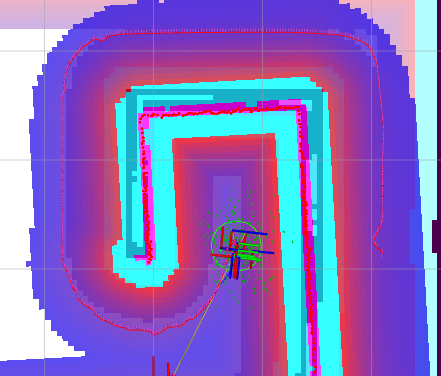
図みたいな回り込む感じの経路だといい感じに動いてくれない1。パラメータ調整めんどくさいやだやる気出ないいい感じのcritic作ろ。
アイデア
経路のうちロボットから見える点をgoalとしてGoalDistっぽく使えばええんちゃうか。
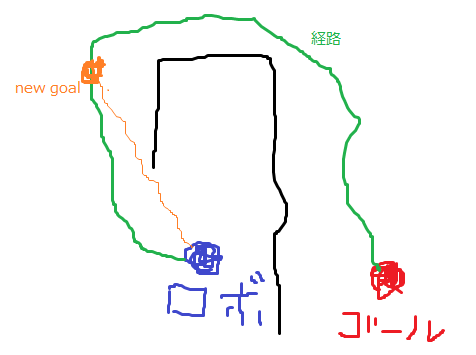
ソースコードなど
my_direct_dist.cpp
#include "my_critics/my_direct_dist.hpp"
#include <vector>
#include <string>
#include "dwb_critics/alignment_util.hpp"
#include "pluginlib/class_list_macros.hpp"
#include "nav_2d_utils/parameters.hpp"
#include "nav_2d_utils/path_ops.hpp"

namespace my_critics
{

    void MyDirectDistCritic::onInit()
    {
        GoalDistCritic::onInit();
        auto node = node_.lock();
        if (!node)
        {
            throw std::runtime_error("Failed to lock node. Node might be expired or not initialized properly.");
        }
        robot_size_ = nav_2d_utils::searchAndGetParam(
            node,
            dwb_plugin_name_ + "." + name_ + ".robot_size", costmap_->getResolution());
        RCLCPP_INFO(rclcpp::get_logger("DirectDist"), "robot_size_:%lf,%s", robot_size_, dwb_plugin_name_.c_str());
    }

    //  poseとp_x,p_yの途中に障害物がなければ真
    bool MyDirectDistCritic::isPathValid(const double p_x, const double p_y, const geometry_msgs::msg::Pose2D &pose, const double skip_dist)
    {
        const double angle_to_point = atan2(p_y - pose.y, p_x - pose.x);
        const double dist_to_point = hypot(p_y - pose.y, p_x - pose.x);
        unsigned int map_x, map_y;
        bool is_valid = false;
        for (double dist = skip_dist; dist < dist_to_point + skip_dist; dist += skip_dist)
        {
            const double w_x = pose.x + std::min(dist, dist_to_point) * cos(angle_to_point);
            const double w_y = pose.y + std::min(dist, dist_to_point) * sin(angle_to_point);
            if (!costmap_->worldToMap(w_x, w_y, map_x, map_y) ||
                nav2_costmap_2d::MAX_NON_OBSTACLE < costmap_->getCost(map_x, map_y))
            {
                return false;
            }
            else
            {
                is_valid = true;
            }
        }
        return is_valid;
    }

    bool MyDirectDistCritic::prepare(
        const geometry_msgs::msg::Pose2D &pose, const nav_2d_msgs::msg::Twist2D &vel,
        const geometry_msgs::msg::Pose2D &goal,
        const nav_2d_msgs::msg::Path2D &global_plan)
    {
        double costmap_resolution = costmap_->getResolution();
        nav_2d_msgs::msg::Path2D adjusted_global_plan = nav_2d_utils::adjustPlanResolution(
            global_plan,
            costmap_resolution);
        int start_idx = -1;
        int end_idx = -1;
        // 有効な範囲のパスを出しておく
        for (unsigned int i = 0; i < adjusted_global_plan.poses.size(); ++i)
        {
            double p_x = adjusted_global_plan.poses[i].x;
            double p_y = adjusted_global_plan.poses[i].y;
            unsigned int map_x, map_y;
            if (!costmap_->worldToMap(p_x, p_y, map_x, map_y))
            {
                break;
            }
            if (start_idx == -1)
            {
                start_idx = static_cast<int>(i);
            }
            end_idx = static_cast<int>(i);
        }
        // 有効ではないので処理しない
        if (start_idx == -1 || end_idx == -1)
        {
            RCLCPP_ERROR(rclcpp::get_logger("MyDirectDist"), "non valid index.");
            return GoalDistCritic::prepare(pose, vel, goal, global_plan);
        }

        // パスのうち、直進で到達できる最も遠い点を求める
        //   処理を軽くするため適当にskipしながら処理
        //   endからやれば計算量減りそうだけど、skipしてるので通れない隙間を貫通する可能性があるのでstartからやる
        const double skip_dist = std::max(robot_size_ / 2.0, costmap_resolution);
        const unsigned int skip_idx = static_cast<unsigned int>(std::max(ceil(skip_dist / costmap_resolution) - 1, 1.0));
        int target_point_idx = -1;
        for (unsigned int i = static_cast<unsigned int>(start_idx); i < static_cast<unsigned int>(end_idx) + skip_idx; i += skip_idx)
        {
            unsigned int path_idx = std::min(i, static_cast<unsigned int>(end_idx));
            const double p_x = adjusted_global_plan.poses[path_idx].x;
            const double p_y = adjusted_global_plan.poses[path_idx].y;
            if (isPathValid(p_x, p_y, pose, skip_dist))
            {
                target_point_idx = static_cast<int>(path_idx);
            }
            else
            {
                break;
            }
        }
        if (-1 < target_point_idx)
        {
            nav_2d_msgs::msg::Path2D target_poses;
            target_poses.poses.push_back(adjusted_global_plan.poses[target_point_idx]);
            return GoalDistCritic::prepare(pose, vel, goal, target_poses);
        }
        else
        {
            RCLCPP_ERROR(rclcpp::get_logger("MyDirectDist"), "can't find target.");
            return GoalDistCritic::prepare(pose, vel, goal, adjusted_global_plan);
        }
    }
}

PLUGINLIB_EXPORT_CLASS(my_critics::MyDirectDistCritic, dwb_core::TrajectoryCritic)
my_direct_dist.hpp
#ifndef MY_CRITICS__MY_DIRECT_DIST_HPP_
#define MY_CRITICS__MY_DIRECT_DIST_HPP_

#include "my_critics/visibility_control.h"
#include <vector>
#include <string>
#include "dwb_critics/goal_dist.hpp"

namespace my_critics
{
  class MyDirectDistCritic : public dwb_critics::GoalDistCritic
  {
  public:
    MyDirectDistCritic()
        : robot_size_(0.0){};
    void onInit() override;
    bool prepare(
        const geometry_msgs::msg::Pose2D &pose, const nav_2d_msgs::msg::Twist2D &vel,
        const geometry_msgs::msg::Pose2D &goal, const nav_2d_msgs::msg::Path2D &global_plan) override;

  protected:
    bool isPathValid(const double p_x, const double p_y, const geometry_msgs::msg::Pose2D &pose, const double skip_dist);
    double robot_size_;
  };

} // namespace my_critics

#endif // MY_CRITICS__MY_DIRECT_DIST_HPP_
CMakeList.txt
cmake_minimum_required(VERSION 3.8)
project(my_critics)

if(CMAKE_COMPILER_IS_GNUCXX OR CMAKE_CXX_COMPILER_ID MATCHES "Clang")
  add_compile_options(-Wall -Wextra -Wpedantic)
endif()

# find dependencies
find_package(ament_cmake REQUIRED)
find_package(ament_cmake_ros REQUIRED)
find_package(nav_2d_utils REQUIRED)
find_package(nav2_util REQUIRED)
find_package(nav2_costmap_2d REQUIRED)
find_package(nav_2d_msgs REQUIRED)
find_package(dwb_core REQUIRED)
find_package(dwb_critics REQUIRED)
find_package(geometry_msgs REQUIRED)
find_package(pluginlib REQUIRED)
find_package(rclcpp REQUIRED)

add_library(${PROJECT_NAME} SHARED src/my_direct_dist.cpp)
target_compile_features(${PROJECT_NAME} PUBLIC c_std_99 cxx_std_17)  # Require C99 and C++17
target_include_directories(${PROJECT_NAME} PUBLIC
  $<BUILD_INTERFACE:${CMAKE_CURRENT_SOURCE_DIR}/include>
  $<INSTALL_INTERFACE:include>)
ament_target_dependencies(
  ${PROJECT_NAME}
  "nav_2d_utils"
  "nav2_util"
  "nav2_costmap_2d"
  "nav_2d_msgs"
  "dwb_core"
  "dwb_critics"
  "geometry_msgs"
  "pluginlib"
  "rclcpp"
)

# Causes the visibility macros to use dllexport rather than dllimport,
# which is appropriate when building the dll but not consuming it.
target_compile_definitions(${PROJECT_NAME} PRIVATE "MY_CRITICS_BUILDING_LIBRARY")

install(
  DIRECTORY include/
  DESTINATION include
)
install(
  TARGETS ${PROJECT_NAME}
  EXPORT export_${PROJECT_NAME}
  ARCHIVE DESTINATION lib
  LIBRARY DESTINATION lib
  RUNTIME DESTINATION bin
)

if(BUILD_TESTING)
  find_package(ament_lint_auto REQUIRED)
  # the following line skips the linter which checks for copyrights
  # comment the line when a copyright and license is added to all source files
  set(ament_cmake_copyright_FOUND TRUE)
  # the following line skips cpplint (only works in a git repo)
  # comment the line when this package is in a git repo and when
  # a copyright and license is added to all source files
  set(ament_cmake_cpplint_FOUND TRUE)
  ament_lint_auto_find_test_dependencies()
endif()

ament_export_include_directories(
  include
)
ament_export_libraries(
  ${PROJECT_NAME}
)
ament_export_targets(
  export_${PROJECT_NAME}
)

pluginlib_export_plugin_description_file(dwb_core critics.xml)
ament_package()
package.xml
<?xml version="1.0"?>
<?xml-model href="http://download.ros.org/schema/package_format3.xsd" schematypens="http://www.w3.org/2001/XMLSchema"?>
<package format="3">
  <name>my_critics</name>
  <version>0.0.0</version>
  <description>TODO: Package description</description>
  <maintainer email="trsing@trsing.com">trsing</maintainer>
  <license>TODO: License declaration</license>

  <buildtool_depend>ament_cmake_ros</buildtool_depend>

  <depend>nav_2d_utils</depend>
  <depend>nav2_util</depend>
  <depend>nav2_costmap_2d</depend>
  <depend>nav_2d_msgs</depend>
  <depend>dwb_core</depend>
  <depend>dwb_critics</depend>
  <depend>geometry_msgs</depend>
  <depend>pluginlib</depend>
  <depend>rclcpp</depend>

  <test_depend>ament_lint_auto</test_depend>
  <test_depend>ament_lint_common</test_depend>

  <export>
    <build_type>ament_cmake</build_type>
  </export>
</package>
critics.xml
<library path="my_critics">
    <class type="my_critics::MyDirectDistCritic" base_class_type="dwb_core::TrajectoryCritic">
        <description>Scores trajectories based on how far along visible point of the global path they end up.</description>
    </class>
</library>
使い方
namespaceの追加以外は通常のcriticと同じ。
controller_server:
  ros__parameters:
    controller_plugins: ["FollowPath"]
    # DWB parameters
    FollowPath:
      default_critic_namespaces: ["dwb_critics","my_critics"]
      critics: ["RotateToGoal", "Oscillation", "BaseObstacle", "GoalAlign", "PathAlign", "PathDist", "GoalDist", "MyDirectDist"]
      MyDirectDist.scale: 20.0
      MyDirectDist.robot_size: 0.2
robot_sizeは候補とする経路の点やロボット-点間の障害物有無確認の細かさに関係。大きくしすぎると途中にある障害物を見つけれなかったりするので注意。
注意点
gazeboでちょろっと動かしただけなのでまともに動くかどうかは知らぬ。
その他
CMakeList.txt何もわからん…。
-
GoalDistCriticはgoalからの距離でコストを張る。障害物等は関係ないので回り込む(goalから離れる)経路と相性が悪い。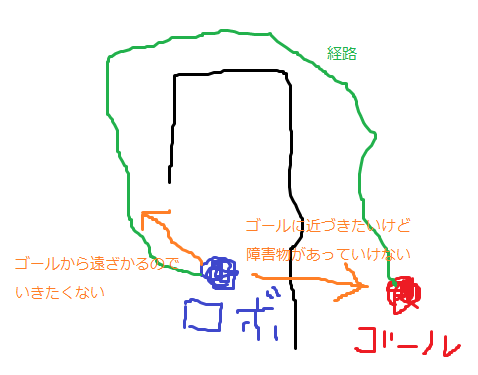
GoalDistCritic
Conflict-based searchメモ
はじめに
お仕事で群制御せななあという感じになってきたので調べてるとMAPFという分野(?)がそれっぽく、 この分野ではCBSを知ってて当然みたいな感触。 のわりに日本語での解説を見つけられなかったので元の論文(多分)を読んだ。
元論文
https://www.sciencedirect.com/science/article/pii/S0004370214001386
CBSだけじゃなくてMAPFの難しさや先行事例についてもざっと説明してくれてるでとてもありがたかった。
今回のメモには書かないけどCBSで最適解が得られることの証明やCBSの欠点とその緩和方法(MA-CBS)についても書いてる。ありがたや。
前提知識
ヒューリスティック探索の基礎(?)。次の資料によくまとまってる。日本語。うれしい。
https://jinnaiyuu.github.io/pdf/textbook.pdf
MAPFについて
multi-agent pathfinding。 複数のエージェントが衝突せずにそれぞれのゴールに到達するまでのパスを求める。 CBSは最適MAPFアルゴリズム。
問題定義
入力
- グラフ:
- k個のエージェント:
- 各エージェントのスタート位置とゴール位置:
- グラフ:
出力
エージェントが衝突せずにゴールに到着するパス(スタート位置からゴールに到着するまでの一連のアクション)制約
- 衝突禁止。同時刻に一つの頂点に2つ以上のエージェントが存在することはできない。
- すれ違い禁止。連続した時間ステップで2つ以上のエージェントがエッジを横切ることはできない。
コスト関数 今回使用するコスト関数はSum-of-costs。 各エージェントがゴールに到着して停止1するまでにかかった時間の総和。
MAPFの難しさ
探索空間が指数関数的に増加する。
1ステップで。
格子型のマップ2でエージェント数が20なら
。1ステップでこれ。やってられっか。
CBSアルゴリズム
二つのレベル(High,Low)の処理で構成される。
HighレベルはCT(constraint tree)を探索する。衝突のないnodeが見つかったらそれをgoalとして終了。
Lowレベルは対象エージェントに対するパスを生成する。
constraint tree
二分木3。各ノードは次の情報から構成される。
- 制約集合(N.constraints):各制約は
(時刻
でエージェント
に頂点
にいることを禁止)または
(時刻tでエージェント
から
への移動を禁止。すれ違いを防ぐ)。 親ノードのconstraintsに制約を一つ加えたものを持つ。4
- 解(N.solution):それぞれのエージェントに対するパス。 パスは制約(N.constraints)を満たす。5
- 総コスト(N.cost):解(N.solution)のコスト。それぞれのパスのコストの総和。ノードのf-value(論文の1.や3.3.1.参照)。
Highレベル
CTに対し、最良優先探索を行う。評価基準はコスト(N.cost)。コストが同じ場合は衝突が少ない方を優先する。 解(N.solution)を検証し、衝突がある場合は衝突を防ぐ制約を追加した子ノードを生成し処理を続ける。 衝突がない場合はノードNをgoalとし処理を終了する。
Lowレベル
対象エージェントと制約集合を受け取り、エージェント
に対して制約を満たす最適パスを生成する。
エージェント
以外は存在しないものとして探索する。
論文ではA*を使用しているがsingle-agent pathfindingアルゴリズムを使用できる。
疑似コード
python風。
root = Node()
root.constraints = 空集合 # 制約なし
root.solution = 各エージェントのパス # 制約なしでlow level処理したもの
root.cost = root.solutionのコスト
open.put(root)
while not open.empty():
    node = openリスト中の一番コスト低いやつ
    conflicts = node.solutionを検証 # 衝突(a_i,a_j,v,t)のリストを得られるとする
    if 衝突無し: # 衝突がないのでgoal
        return node.solution
    conflict = conflictsの最初の衝突
    for agent in conflict: # a_i, a_jに制約を加えた子ノードを作る
        child = Node()
        child.constraints = node.constraintsに(agent, v, t)を加えたもの
        child.solution = node.solution
        child.solution[agent] = agentのパスを更新 # agentについて制約child.constraintsでlow level処理したもの
        child.cost = child.solutionのコスト
        if 解あり:
            open.put(child)
その他
お仕事の要件に近いのMAPD(Multi-Agent Pickup and Delivery)だわ。
SSLを無視する設定
経緯
情シスからセキュリティ強化のお知らせ。git cloneやらpipやらで証明書のエラーが出るようになったので問い合わせると証明書無視する方向で何とかしろとのお返事。ので証明書無視する設定とか。
証明書を無視する設定
git
GIT_SSL_NO_VERIFY=1 git clone https://github.https://github.com/hoge/hoge.git
GIT_SSL_NO_VERIFY は、SSL証明書の検証を行わないようにGitへ指示します。 これは、GitリポジトリをHTTPS経由で利用するために自己署名証明書を使っている場合や、Gitサーバーのセットアップ中で正式な証明書のインストールが完了していない場合などに必要になります。
pip
pip --trusted-host pypi.python.org --trusted-host files.pythonhosted.org --trusted-host pypi.org install <ライブラリ名...>
Mark this host or host:port pair as trusted, even though it does not have valid or any HTTPS.
vs codeのupdate
/etc/wgetrcにcheck_certificate = offを追加
If this is set to off, the server certificate is not checked against the specified client authorities. The default is “on”. The same as ‘--check-certificate’.
vs codeの設定ではなくwgetの設定なので注意。
curl
curl --insecure https://192.168.1.2
By default, every secure connection curl makes is verified to be secure before the transfer takes place. This option makes curl skip the verification step and proceed without checking.
感想
セキュリティ強化でSSLインスペクションを採用したっぽい。その結果証明書無視することになったけどこれセキュリティ強化になるのかな?
その他
開発環境損を大事にする転職先募集先です。
ros pythonでsubscribeを停止する
subscribe登録時の返り値を保持しておく。
subscribe開始
hoge_sub_ = rospy.Subscriber('hoge', Bool, on_sub_hoge_)
subscribe停止
hoge_sub.unregister()
C++の場合は.shutdown()
Jetson Orinでpyrealsense2を使う
これ
補足
cmakeのバージョンに注意。上記コメントでは3.13。どのバージョンからかPYTHON_EXECUTABLEの取り扱いが変わってるっぽい(PYTHON_EXECUTABLE->Python_EXECUTABLE?よくわからない…)
追記
cmake 3.25.2でのビルド結果
librealsense 2.54.1
問題なくビルドできた(make -j4まで完了)
librealsense 2.38.1
cmakeでエラー。Could NOT find Python
librealsense 2.38.1でオプションを-DPYTHON_EXECUTABLE->-DPython_EXECUTABLE
問題なくビルドできた(make -j4まで完了)
